
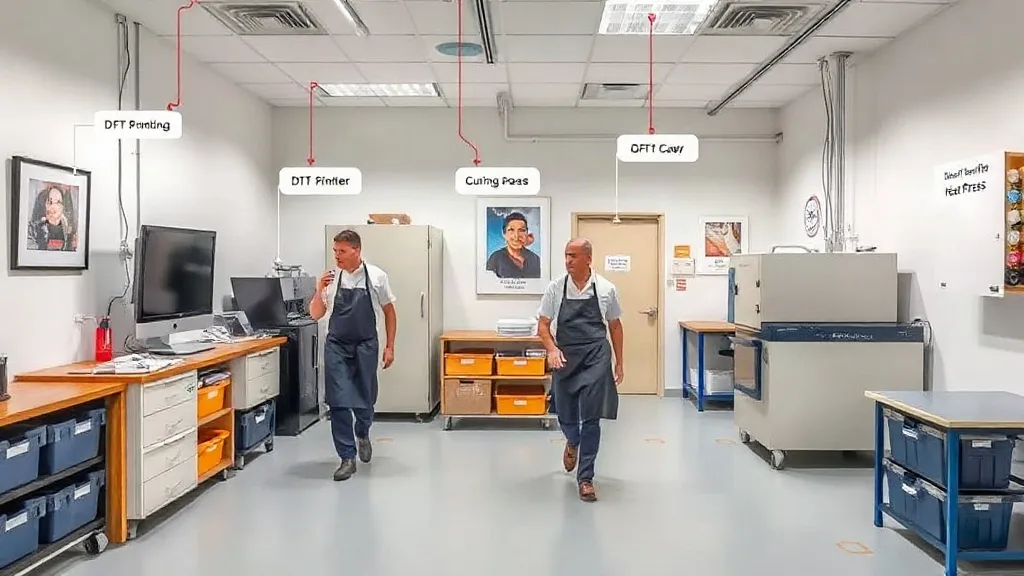
Walk into two print shops with identical equipment and you will often see wildly different output. One runs smoothly, the other seems to fight itself all day. The difference is rarely the printer or the press. It is the layout. How you arrange your dtf transfers workflow, from the moment a file lands in your inbox to the second a finished shirt is folded, determines how many steps your team takes, how many errors slip through, and how much money you actually keep. In this guide, we will look at the physical and digital layout of a DTF operation and show you how to design a space that supports speed, quality, and profit.
The hidden cost of a bad layout
Most shop owners focus on the printer, the powder, and the film. Those matter, but they are only part of the picture. A poor layout creates hidden costs that eat into your margin every single day. Think about the last time someone had to walk across the shop to grab a forgotten roll of film, or when a job was printed but sat waiting because the powder station was cluttered. Those minutes add up. A study of lean manufacturing principles shows that unnecessary motion and waiting are two of the seven wastes. In a small print shop, those wastes show up as lost time, higher energy bills, and frustrated employees.
More importantly, a bad layout increases the chance of mistakes. If the curing oven is far from the printer, wet prints might get bumped or contaminated. If the heat press is in a separate room, communication breaks down and jobs get pressed with the wrong settings. Each of these errors costs you material, time, and sometimes a customer.
Mapping the DTF workflow
Before you move a single table, map out the actual steps a job takes. For dtf printing, the core steps are: file preparation, printing, powdering, curing, and pressing. There is also storage for blanks and finished goods, plus a packing and shipping area. A good layout arranges these steps in a logical sequence with minimal backtracking. Ideally, the workflow should flow in a U-shape or a straight line, with each station close to the next.
File prep and printing
Start with the design station. This is where files are checked, sized, and nested into gang sheets. It should be near the printer so the operator can quickly send a job and monitor the print. Keep a small shelf or drawer with spare film, ink, and cleaning supplies right there. The goal is to avoid leaving the printer unattended for long stretches.
Powdering and curing
The powder station is often the messiest part of the process. Place it next to the printer but in a contained area, ideally with a downdraft table or a simple tray to catch excess powder. The curing oven should be within arm's reach of the powder station. You want to move the printed film from printer to powder to oven in one smooth motion, without crossing paths with other activities. A distance of more than a few steps here will slow you down and increase the risk of spills.
Pressing and finishing
The heat press area should be separate from the printing area to avoid dust and moisture. But it should still be close enough that jobs can be passed quickly. Set up a small table next to the press for placing the garment, aligning the transfer, and peeling. Have a bin for waste film and a rack for finished items. If you also do sewing or embroidery, keep those stations out of the main DTF flow to prevent congestion.
Zoning your shop for efficiency
Divide your shop into clear zones: design, print, powder/cure, press, and storage. Use floor markings or different colored bins to reinforce the zones. This not only helps your current team but makes it easier to train new hires. When everyone knows where things belong, you reduce the time spent searching for tools and materials.
Storage is often overlooked. You need organized storage for film, powder, blanks, and finished transfers. Keep frequently used items within easy reach and less common items on higher shelves. Use labels and inventory cards. A simple kanban system can prevent stockouts and overordering.
Digital layout: organizing your files and orders
Your physical space is only half the battle. The digital side of your dtf transfers operation can also be a bottleneck. If your files are scattered across emails, USB drives, and desktops, you will waste time hunting for them. Set up a clear folder structure: one for incoming orders, one for in-progress, one for completed, and one for archived. Use a naming convention that includes the order number and customer name. Consider a simple order management tool or a spreadsheet that tracks each job from intake to shipping.
Also, keep your printer and RIP software settings documented. A digital layout includes saved presets for different garment types and transfer sizes. This reduces setup time and ensures consistency, which is especially important when you have multiple operators.
Small layout tweaks that pay off
You do not need to rebuild your shop from scratch. Start with these low-cost improvements:
- Place a small table or cart next to the printer for immediate supplies.
- Use a rolling cart to move jobs between stations instead of carrying them by hand.
- Install a shelf above the press for frequently used tools like teflon sheets and lint rollers.
- Keep a trash bin at every station to avoid clutter.
- Use vertical storage for film rolls to save floor space.
These changes might seem minor, but they add up to significant time savings over a week.
Scaling your layout as you grow
As your order volume increases, your layout will need to evolve. What works for a one-person shop may not work for a team of three. Plan for growth by leaving room for an additional press or a second printer. Modular furniture and mobile carts make it easy to reconfigure. Also, consider the flow of people: if you add staff, you want to avoid crossing paths that cause collisions or delays.
If you are looking to add dtf transfers near me services to your offerings, you might need a dedicated area for customer pickup. Keep this separate from the production floor to avoid distractions and safety hazards.
Common layout mistakes to avoid
Even experienced shop owners fall into these traps:
- Putting the powder station in a high-traffic area, leading to spills and contamination.
- Storing blanks far from the press, causing extra walking.
- Using the same work surface for powdering and pressing, which can transfer powder to garments.
- Ignoring ventilation; curing ovens and powders need proper airflow.
- Failing to separate clean and dirty processes; keep finished garments away from powder and ink.
Steer clear of these and you will see fewer errors and faster turnaround.
Frequently asked questions
How much space do I need for a DTF printing setup?
A minimal setup can fit in about 100 square feet if you are clever with vertical storage and use a small format printer. However, for a comfortable workflow with a heat press and curing oven, aim for at least 200 square feet. The key is to have distinct zones without cramping.
Can I combine the powdering and curing stations?
Yes, many shops use a combined powder and cure unit, which saves space. Just ensure that the powder application area is contained and that the oven is well-ventilated. Keep a small vacuum or tray to catch excess powder.
What is the best way to organize DTF transfer film?
Store film rolls vertically in a rack or bin to prevent them from flattening. Keep them away from direct sunlight and humidity. For printed transfers, use a flat file or a binder with plastic sleeves to keep them clean and organized.
How can I reduce wasted motion in my shop?
Observe your team for a day and note every time someone walks more than a few steps to get something. Then relocate frequently used items closer to the point of use. Group tasks that use the same tools together. A simple change like putting the tape and scissors next to the press can save minutes per job.
Do I need a separate room for DTF printing?
Not necessarily, but you should isolate the powder and curing area to contain dust and fumes. Use curtains or partitions if a separate room is not possible. Also, maintain proper ventilation to ensure a safe and clean environment.